For golf clubs
The club portal: your tee sheet, team and figures in one place
Everything your club runs on Tee Time lives in one back office: the club portal. Each member of staff signs in with their own account and sees only what their role allows. Here are the main parts of it, with screenshots of an example club.
Running the day
Today: the day sheet
The desk's view of the day: every tee time with its bookings, members' times marked, and totals for bookings, players, check-ins, no-shows and payments due at the desk.
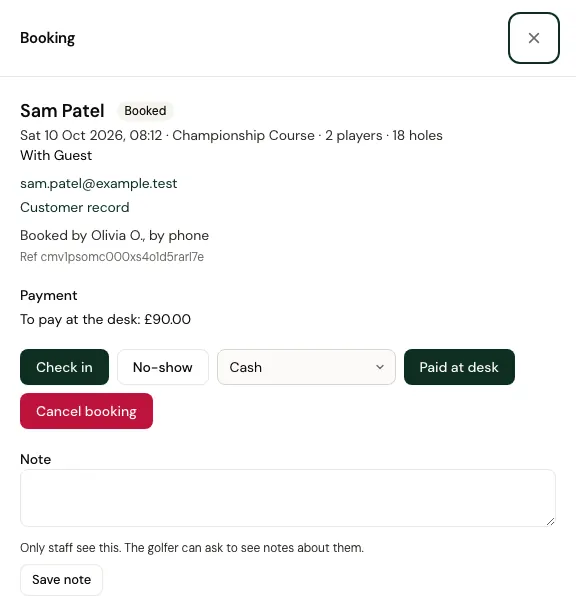
- Open a booking to check golfers in, mark a no-show, record payment at the desk (cash or card machine), move it to another time, cancel it, or refund an online payment in full or in part.
- Take bookings for customers over the phone or at the counter, at the listed price or a changed price with a reason.
- Add notes only staff see.
- Close tee times with no bookings for a competition, maintenance or the weather, and reopen them.
- Golfers get an email when staff move, cancel or refund their booking.
Bookings
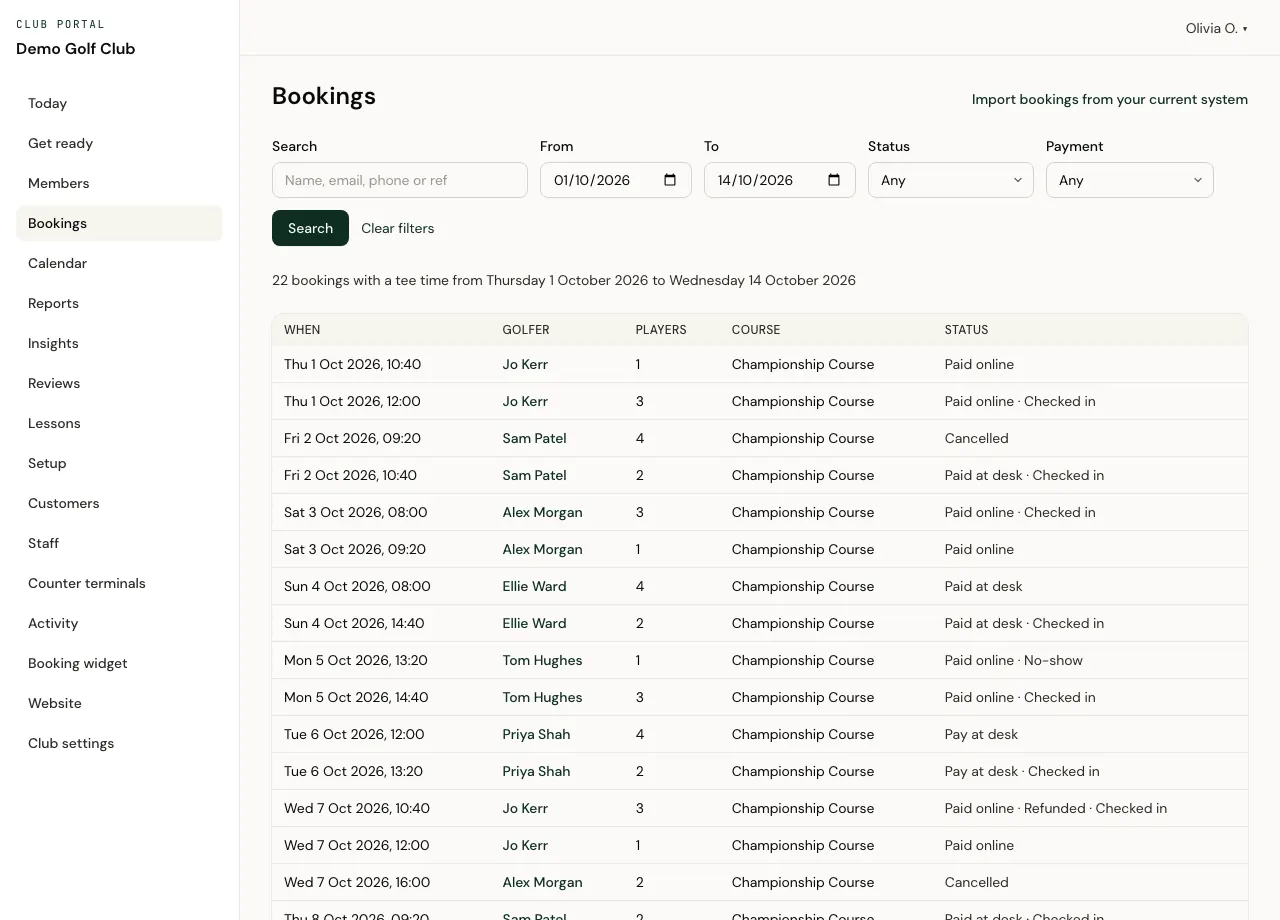
Every booking on your tee sheet, searchable by name, email, phone or booking reference, and filtered by dates, status and payment.
- Each booking opens in full, with its history: who did what, and when.
- Statuses say how it was paid and what happened: paid online, paid at the desk, still to pay, checked in, no-show, cancelled or refunded.
Calendar
A month or week at a glance: the bookings on each day and how much of the tee sheet was filled.
Your tee sheet
Setup
Everything golfers can book, course by course, edited by the people you allow.
- Opening hours and the gap between tee times, with changes for particular days.
- Prices by day, time, season and number of holes, for visitors, members and members' guests. The first rate in your list that fits a tee time wins.
- Special prices for quiet times, shown to golfers as a deal when they're cheaper.
- Extras such as buggies, the numbers of holes you offer, and how far ahead golfers can book.
- Whether golfers pay online when they book or pay at the club.
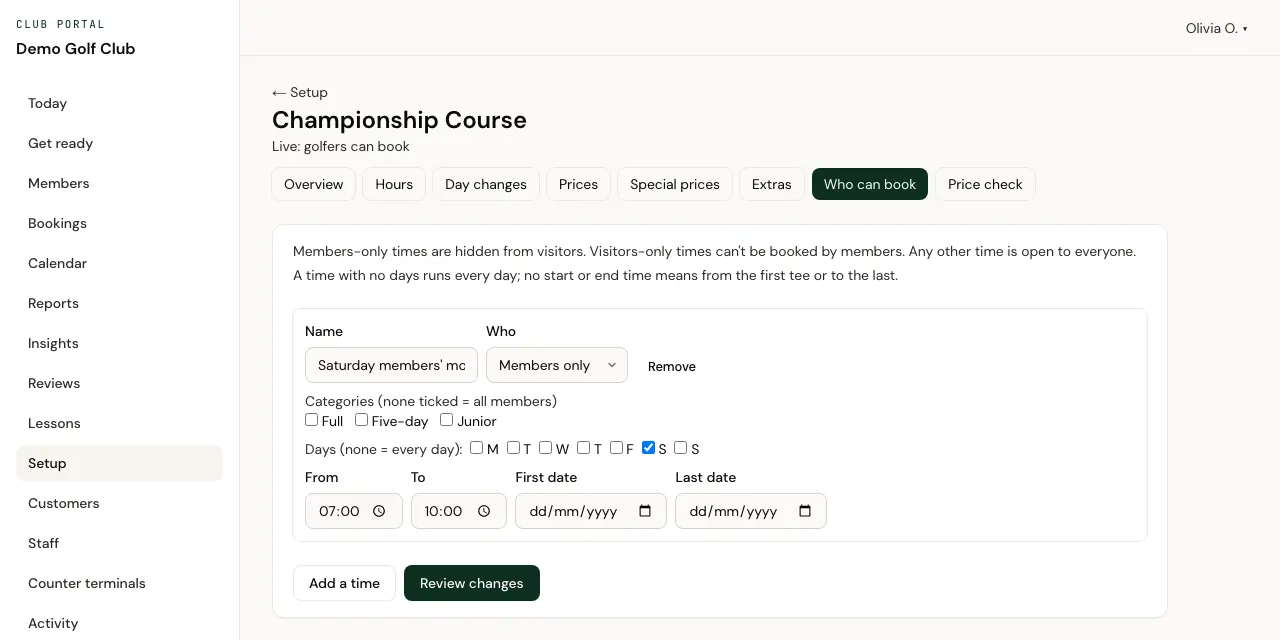
- Which tee times are for members only, for visitors only, or open to everyone.
- A price check for any tee time, and a review of which bookings a change would affect before you save it.
- A go-live checklist, and a way to take a course offline again. Upcoming bookings stay.
Your team
Staff and roles
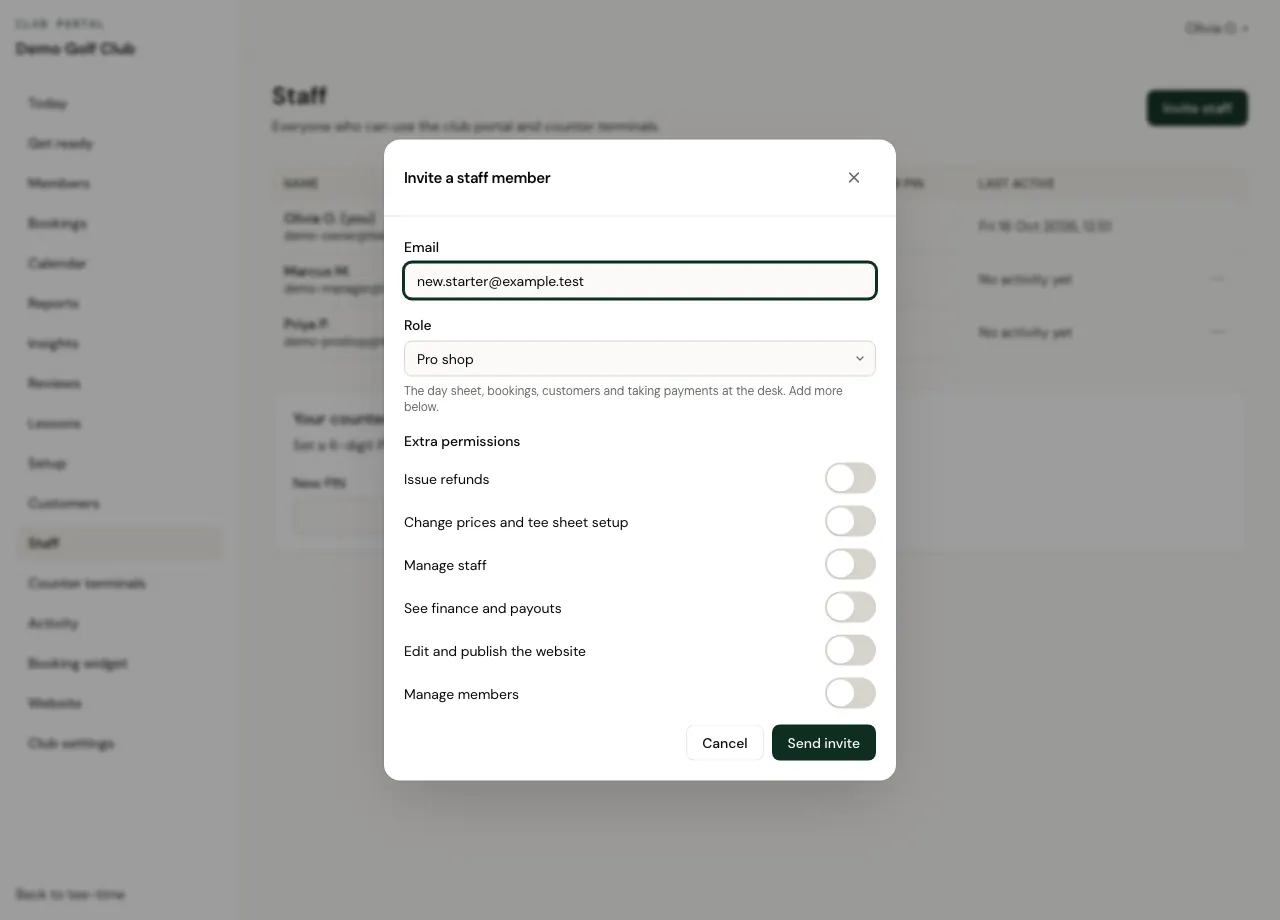
Invite staff by email as an owner, a manager or pro shop staff. Each role starts with sensible permissions, and you switch extras on or off person by person.
- Extras you can give: issue refunds, change prices and tee sheet setup, manage staff, see finance and payouts, edit and publish the website, and manage members.
- Nobody can give a colleague a permission they don't hold themselves.
- A club always keeps at least one owner.
Counter terminals
Register the shared computer in the pro shop as a counter terminal. Each member of staff unlocks it with their own 6-digit PIN, so everything done there is recorded against their name.
- It locks itself when left idle, after 2 to 30 minutes as you choose.
- A refund needs the PIN again.
- Managing staff, settings, prices and finance needs a personal sign-in, never a terminal.
- Too many wrong PINs lock the PIN.
Activity log
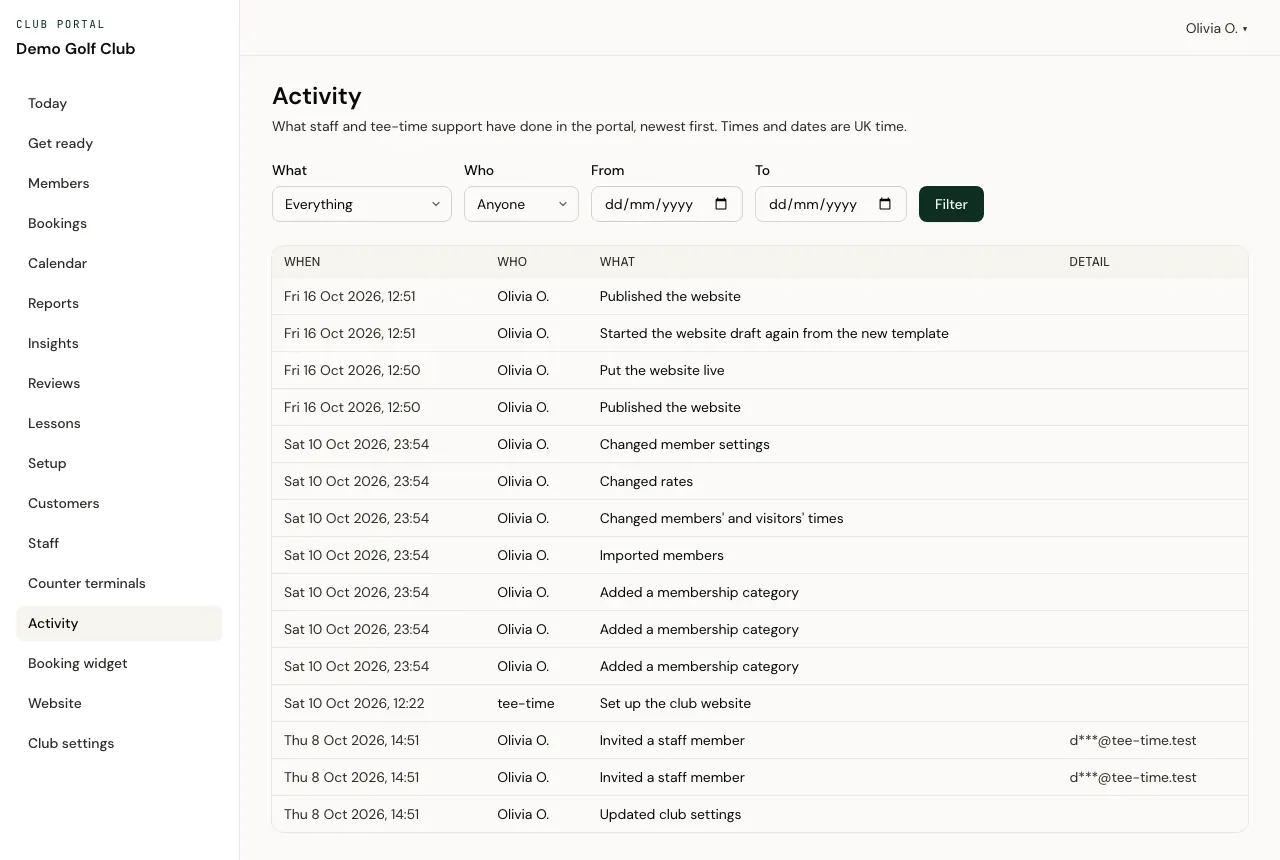
Every change staff and Tee Time support make in the portal, newest first, filtered by what, who and dates.
- Email addresses in the log are masked, and the log can't be edited.
Golfers and members
Customers
One record for each golfer at your club, made when they book or when staff add them. Your club is the controller of these records, and Tee Time is its processor under our data processing agreement, which an owner accepts in the portal.
- Search customers and see their bookings.
- Owners and managers can download a customer's record or erase it. Erasing removes their personal details and keeps the bookings and money for your accounts.
- Customers who haven't booked for 6 years and aren't linked to a Tee Time account or a membership are made anonymous automatically.
Members
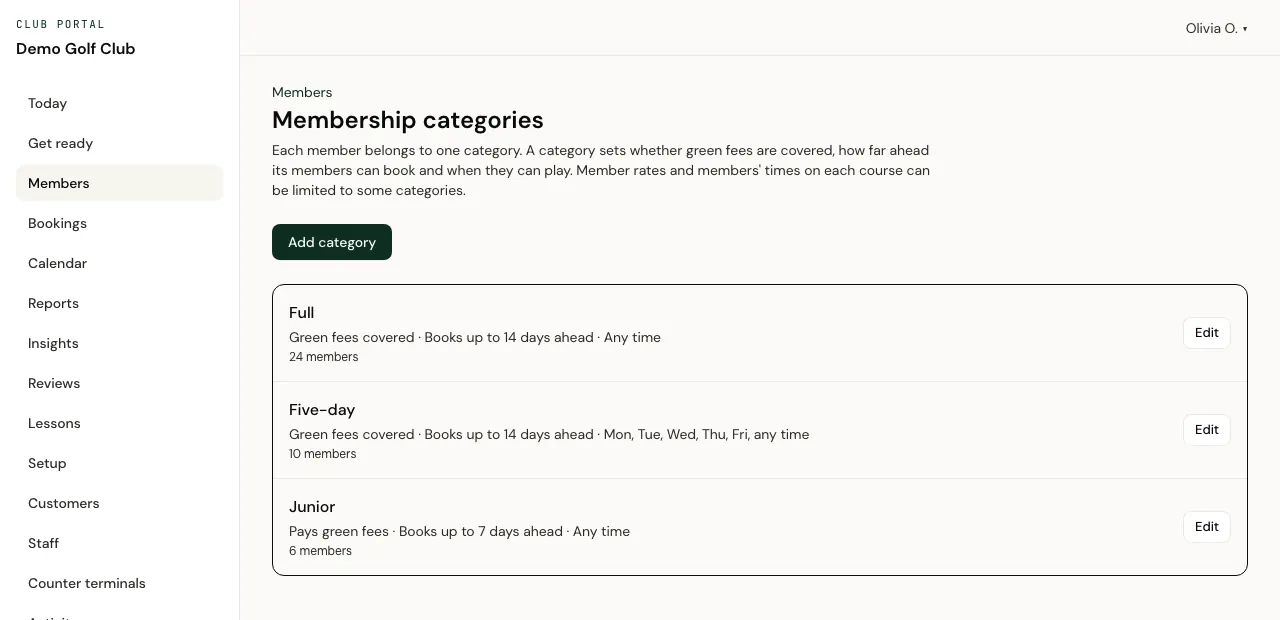
Your members, in categories you define: whether the membership covers the green fee, how far ahead members can book, and the days and times they can play.
- Keep tee times for members, for all of them or for particular categories.
- Give members their own rates, and a rate for their guests.
- Import members from a spreadsheet (CSV), matched on membership number, and download the list again.
- Invite members by email, or give one a link at the desk, to link their Tee Time account to your club. Staff approve anyone else who asks.
- Linked members book their own tee times online, with guests. A covered round shows nothing to pay.
- Leavers' records are erased automatically after the number of months you set.
Reviews and course reports
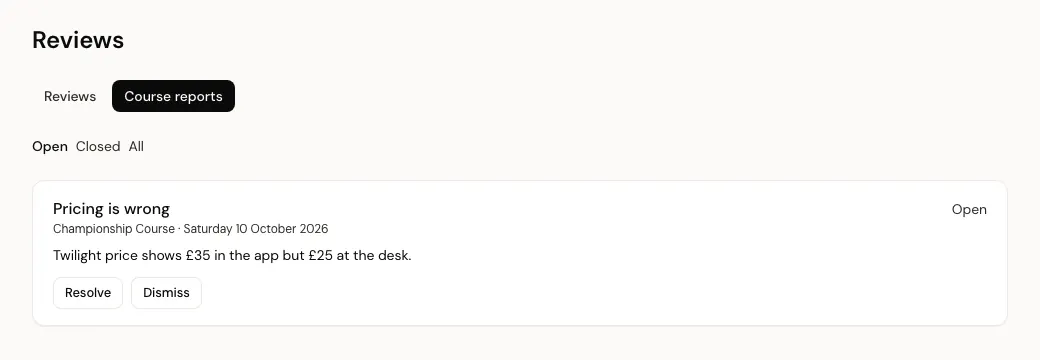
Golfers who booked through Tee Time can review your course after their round, with an optional comment. Golfers also report anything that looks wrong, such as a price or the course details.
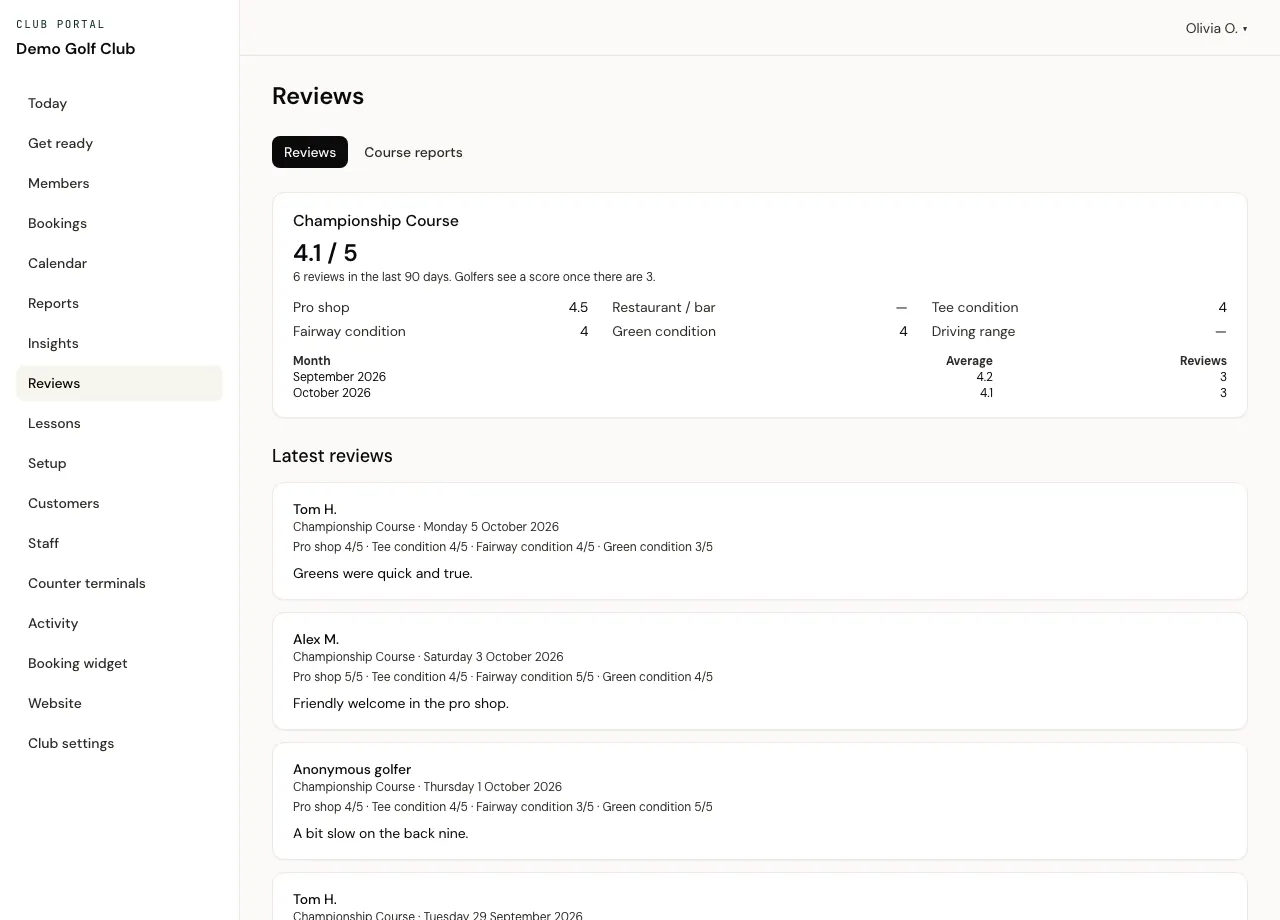
- Each course's average score, scores for the pro shop, restaurant or bar, tee, fairway and green condition and the driving range, and a month-by-month average.
- Every review with the golfer's comment, newest first.
- Golfers see a course's score once it has at least 3 reviews from the last 90 days.
- On courses using your Tee Time tee sheet, resolve or dismiss each course report. The golfer who reported it is never named.
Lessons
Coaches get their own diaries and lesson types, and golfers book lessons online. Golfers pay at the lesson; online lesson payments aren't available yet.
- Each coach sets out their profile, lesson types, prices, weekly hours and time off. A manager puts a coach live.
- A weekly diary for each coach. Staff record attendance and payment at the desk, move and cancel lessons.
- Juniors' ages are shown only to their own coach and to owners and managers.
Selling online
Booking widget
One booking widget for the club, covering the courses you choose, to paste into your current website.
- Your logo, colour, a short introduction, how many days ahead it shows and the usual party size.
- Paste a script, or an iframe where your website doesn't allow scripts.
- List the websites it's on, so Apple Pay works there.
- Counts for the last 30 days, kept without cookies: opens, tee times picked, card payments started, bookings and money paid online.
Website
Your Tee Time club website: pages built for you from your courses, edited in drafts, previewed and published when you're ready.
- Earlier versions are kept, so you can go back to one.
- News posts, a photo library, six colour schemes and five heading styles.
- It stays out of search engines until you tick "This is our main website".
Card payments
An owner opens the club's own Stripe account from the portal, and golfers' online payments, less our commission, are paid to it. Tee Time doesn't hold your money.
- Payouts shows your Stripe balance and recent payouts, read live from Stripe.
Knowing what's working
Insights
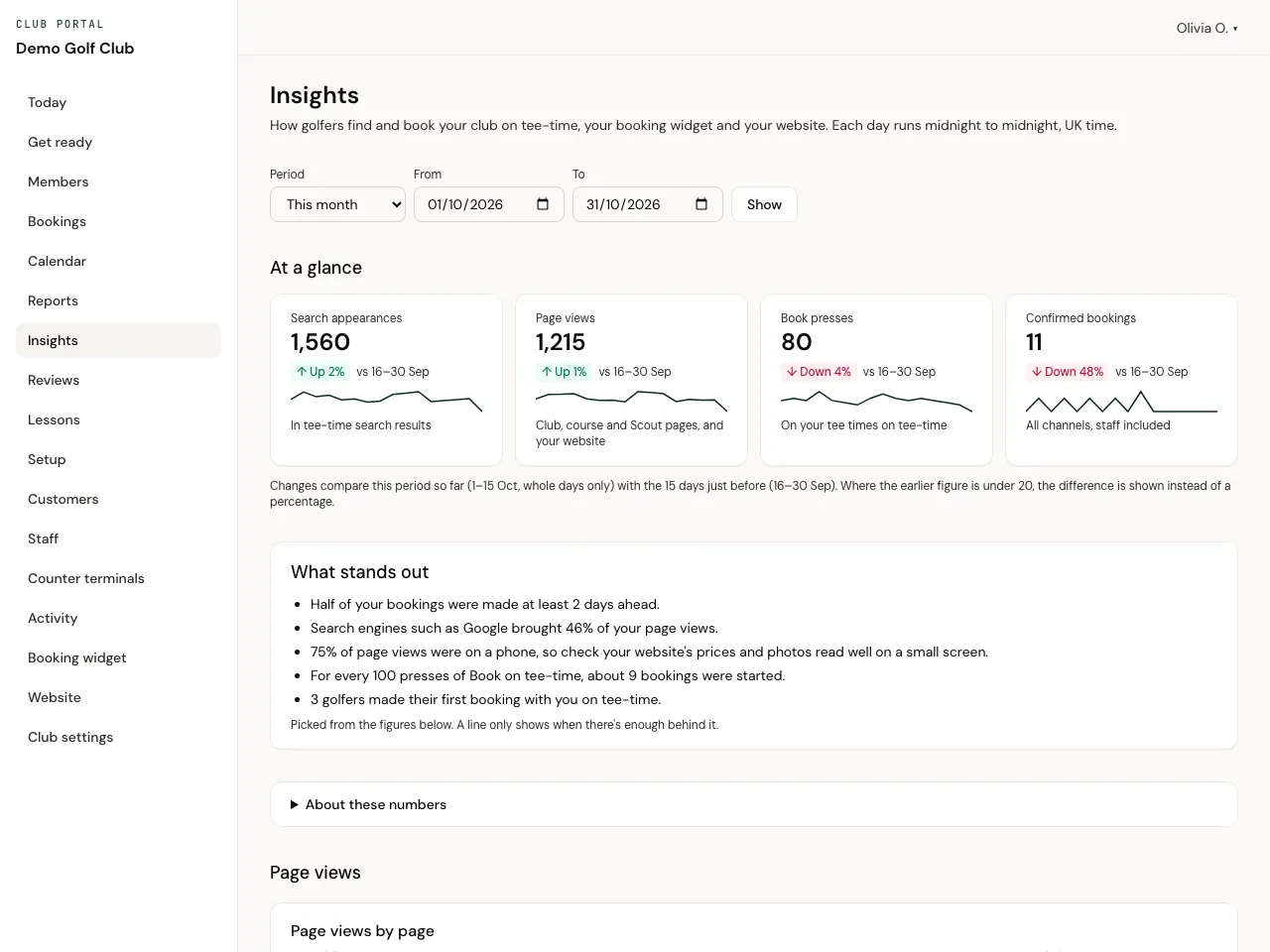
How golfers find and book your club: on Tee Time, through your booking widget and on your website. Counted without cookies, and never about any one golfer.
- How often your courses appear in Tee Time searches, and views of your club page, course pages, Scout previews and website pages.
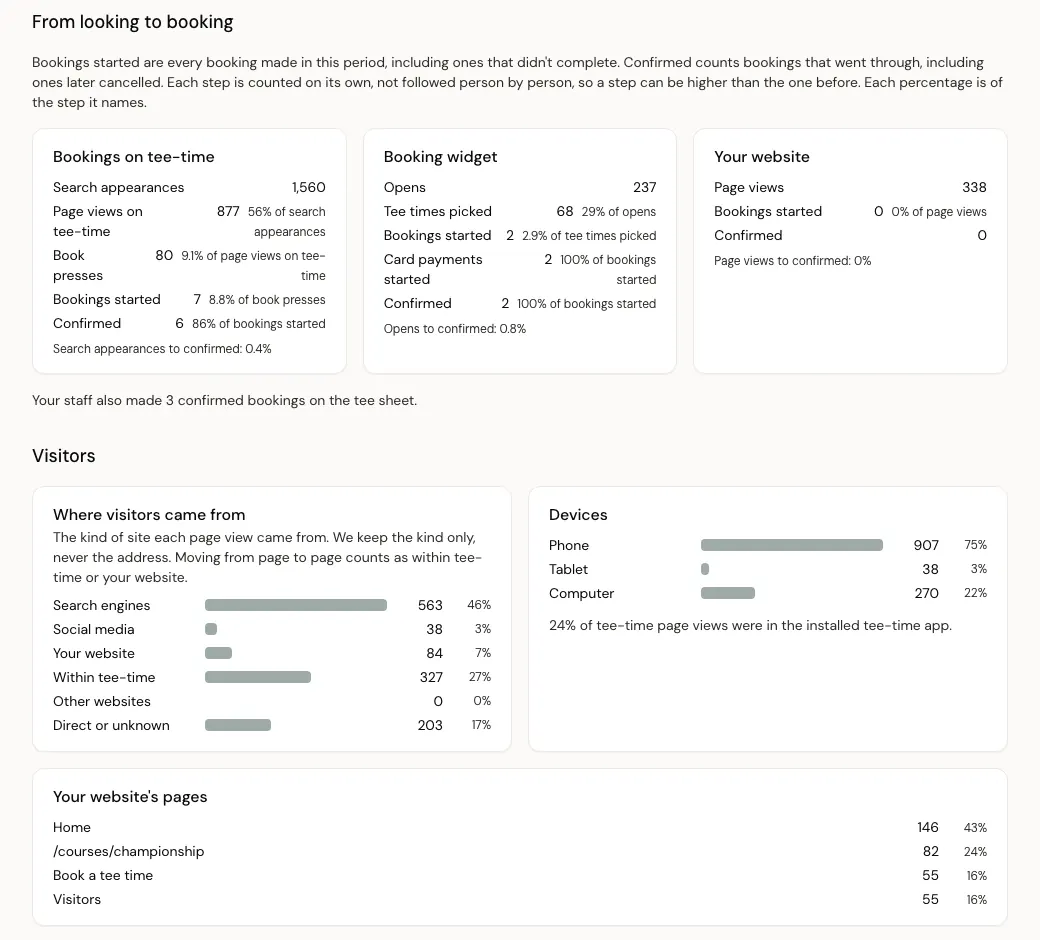
- Book presses and bookings, step by step for each channel, so you can see where golfers drop off.
- Where visitors came from (search engines, social media, your own website, within Tee Time) and which devices they used.
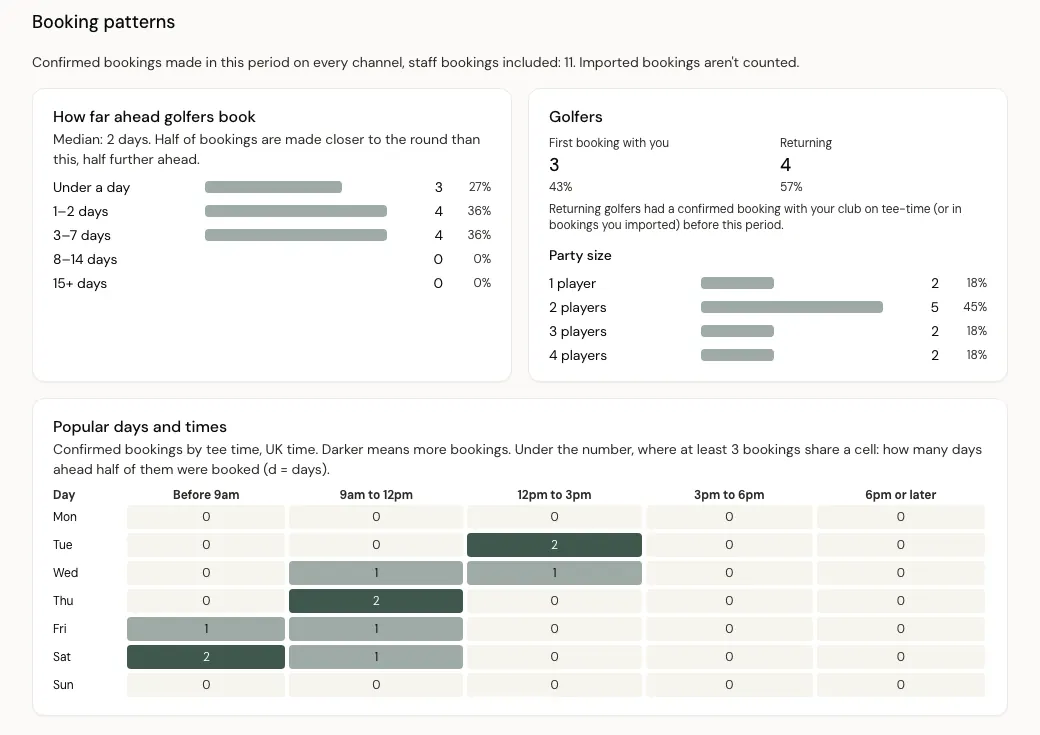
- Booking patterns: how far ahead golfers book, first-time and returning golfers, party sizes and your busiest days and times.
- Each figure compared with the period before, a short list of what stands out, and spreadsheet downloads of the counts.
Reports
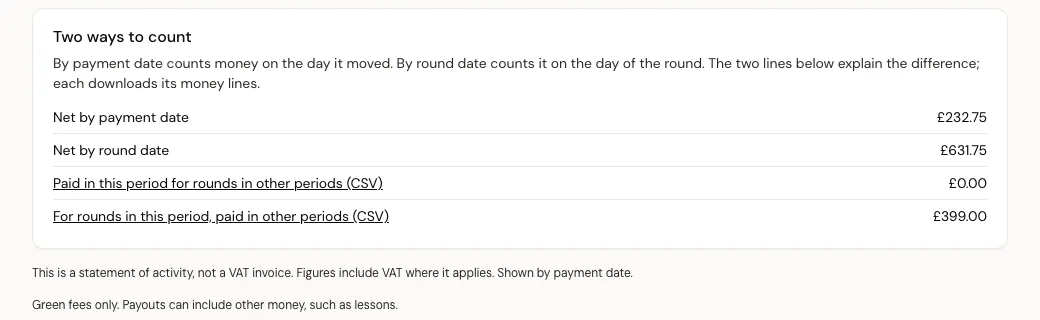
Bookings and money for any period, counted two ways: by the date the money moved or by the date of the round, with the lines that explain the difference.
- Online takings, our commission, refunds and the net paid to your Stripe account; payments recorded at the desk by cash or card machine; and what's still to pay at the desk.
- Bookings, players, how full the tee sheet was, no-shows, check-ins, cancellations and abandoned checkouts.
- Spreadsheet downloads of bookings and money lines, with no golfer email addresses or phone numbers.
- Statements of activity for your records.
Getting started and moving over
Get ready
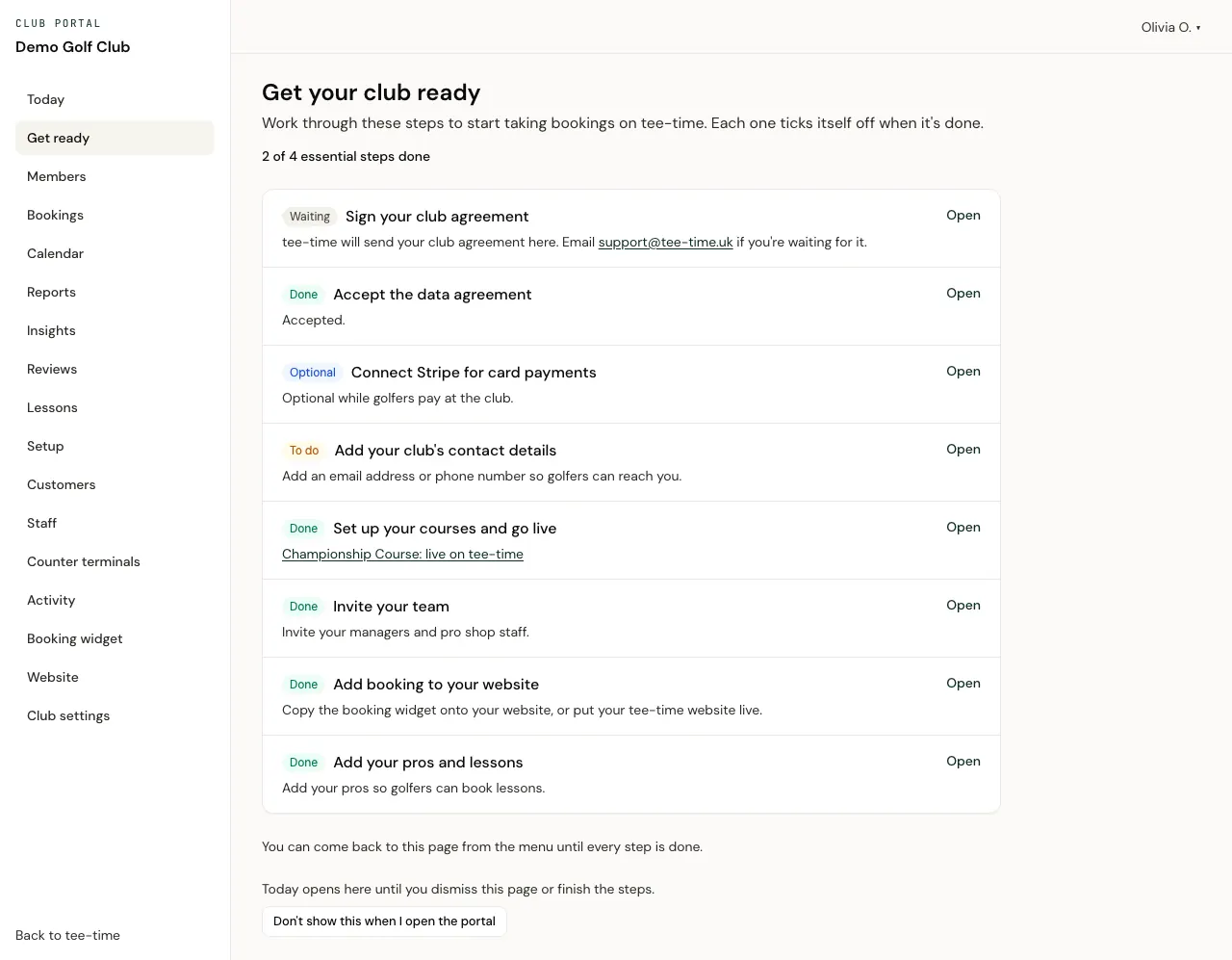
An owner's checklist that ticks itself off as you go: sign the club agreement, accept the data processing agreement, add contact details, set up your courses and go live, and connect card payments if you take payment online.
- Optional steps too: invite your team, add booking to your website and add your pros.
Importing bookings when you move over
Bring across the bookings golfers already made in your current system, from a spreadsheet (CSV) you download from it.
- Match its columns once; the mapping is saved for next time.
- A preview checks every booking against your tee sheet before anything is imported.
- Importing never emails golfers.
- Download the rows that couldn't be imported, close their tee times, or undo the import.
- Set a switch-over time, turn off online booking in your current system from then, and go live.
Club agreement and documents
An owner reads and signs the club agreement in the portal. Signed agreements and accepted data processing agreements are kept as PDFs in Documents.
More for clubs
Questions clubs ask
Can we decide what each member of staff can see and do?
Yes. Choose a role for each person (owner, manager or pro shop) and switch extra permissions on or off: refunds, prices and tee sheet setup, staff, finance and payouts, the website and members.
Can staff share the computer in the pro shop?
Yes. Register it as a counter terminal and each member of staff unlocks it with their own PIN. It locks itself when left idle, a refund needs the PIN again, and managing staff, settings, prices and finance needs a personal sign-in.
Can we see golfers' reviews?
Yes. Reviews and course reports are in the portal: each course's scores, every review with its comment, and the reports golfers make, which you resolve or dismiss.
Can we download our figures?
Yes. Reports and Insights both download as spreadsheets (CSV). Report downloads never include golfers' email addresses or phone numbers.
Talk to us about your club
Email us with your club's name and what you'd like to change: your website, your tee sheet, card payments or all three.
We use what you send to answer you, as our privacy policy explains.